


This section describes setup of logical replication.
To setup logical replication using MTLS, follow these steps:
Create two FEPClusters - to act as Publisher and Subscriber) and ensure that they can communicate with each other. You can see the creation of FEPCluster in the "4.1 Deploying FEPCluster using Operator".
To setup Publisher, make following changes to the FEPCluster yaml of the cluster that you want to use as publisher:
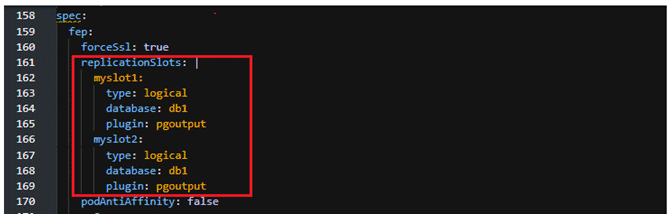
Add section replicationSlots under spec.fep to create replication slots.
The "database" should be the name of the database for which we are setting up logical replication.
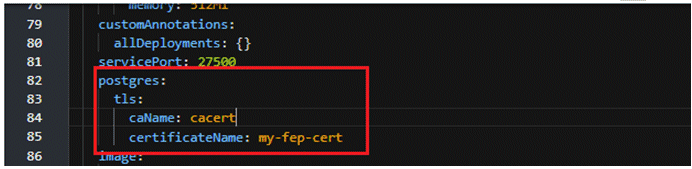
Add section postgres under spec.fep as shown below.
caName = enter the name of configmap created for the CA
certificateName = secret created by the end user that contains server certificate
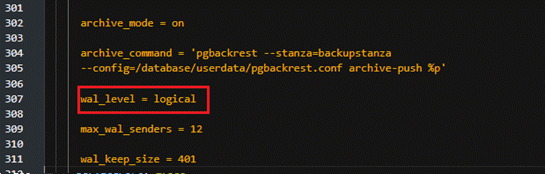
Change the value of wal_level parameter under spec.fepChildCrVal.customPgParams from replica to logical.
Add entry under spec.fepChildCrVal.customPgHba as shown below.
This requires the client to present a certificate and only certificate authentication is allowed.
Replace "SubClusterName" and "SubNamespace" with the appropriate values as per the Subscriber FEPCluster.

To setup Subscriber, make following changes to the FEPCluster yaml of the cluster that you want to use as subscriber:
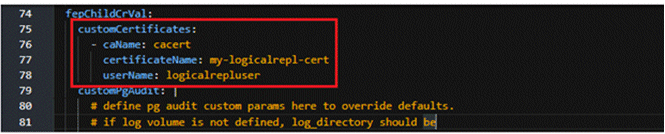
Add customCertificates under spec.fepChildCrVal as shown below.
caName = enter the name of configmap created for the CA ( i.e. The CA certificate which is used to sign/authenticate the server/client certificates is mounted as a configMap called 'cacert' )
certificateName = secret created by end user that contains a client certificate which can be verified by the server
username = name of the role created on publisher cluster for logical replication
Connect to the pod terminal of the Publisher FEPCluster and then connect to the postgres database as shown below.

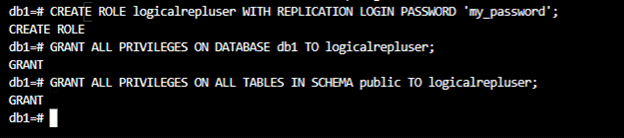
Next, on the publisher side, connect to the database that contains the tables you want to replicate and create a role e.g., logicalrepluser and give the required permissions to this role.
Consider the below image as example only, the privileges to grant may differ as per the requirements.
At the Publisher side, create a publication and alter the publication to add the tables that need to be replicated.

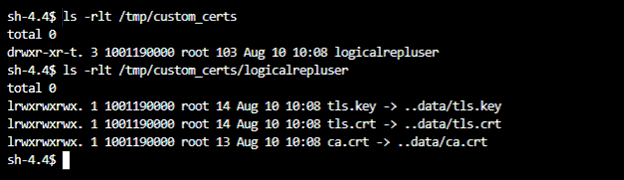
At the subscriber side, the custom certificates added in the above step 3.a will be mounted at the path /tmp/custom_certs/ as shown:
The structure of the table to be replicated should be present in the subscriber cluster since logical replication only replicates the data and not the table structure.
Create a subscription as shown below:

The command in the above example is :
CREATE SUBSCRIPTION my_subscription CONNECTION 'host=fepcluster-publisher-primary-svc.ns-a.svc.cluster.local port=27500 sslcert=/tmp/custom_certs/logicalrepluser/tls.crt sslkey=/tmp/custom_certs/logicalrepluser/tls.key sslrootcert=/tmp/custom_certs/logicalrepluser/ca.crt sslmode=verify-full password=my_password user=logicalrepluser dbname=db1' PUBLICATION my_publication WITH (slot_name=myslot1, create_slot=false);

Host = primary service of the publisher FEP Cluster
sslcert, sslkey, sslrootcert = path to certificates mounted on the Subscriber FEP Cluster
user= Role created on the Publisher side
password= password for the role
dbname= database which contains the tables to be replicated
Host = primary service of the publisher FEP Cluster
sslcert, sslkey, sslrootcert = path to certificates mounted on the Subscriber FEP Cluster
user= Role created on the Publisher side and used to establish logical replication connection fromSubscriber to Publisher
dbname= database which contains the tables to be replicated

