The calculation of search accuracy within a database consists of two major steps: "the calculation of evaluation values for each text chunk in the search results" and "the calculation of search accuracy based on those evaluation values".
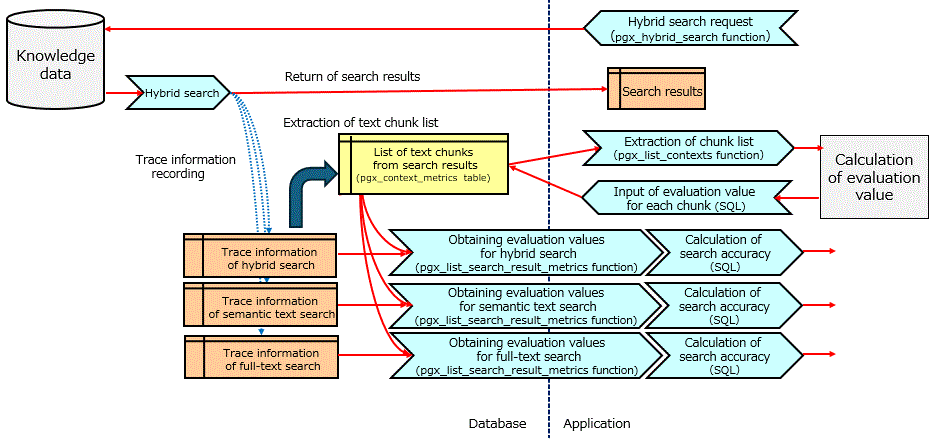
Calculation of evaluation values for each text chunk in the search results
Use the pgx_list_contexts function to extract the text chunks returned by the hybrid search executed and any of its constituent subqueries.
Example) Extract the text chunk returned by the hybrid search with query ID 10001 and any of the subqueries
rag_database=> SELECT pgx_vectorizer.pgx_list_contexts(queryid => 10001);
Match the extracted text chunks with the correct answers for the evaluation queries, calculate the evaluation values for each, and input them into the evaluation value table (pgx_context_metrics table). To input the evaluation values, use the UPDATE statement on the pgx_context_metrics table. For an example of using the UPDATE statement, refer to "3.12.4.1 Example of Calculating Search Accuracy in a Database". The evaluation values can be stored in JSON format to allow calculation of search accuracy using any metric.
Calculation of search accuracy based on evaluation value
The text chunk of the search result from the subquery and its evaluation value can be referenced using the pgx_list_search_result_metrics function. This can be used to calculate search accuracy.
Example) Refer to the search results of full-text search and their evaluation values
rag_database=> SELECT pgx_vectorizer.pgx_list_search_result_metrics(queryid => 10001, subquery_type => 'fulltext');
Explain an example of calculating search accuracy.
First, store the evaluation value in the pgx_context_metrics table. Here, input the evaluation value into the relevance_indicator in JSON format.
{
  "relevance_indicator": 1
}
The evaluation value is set to 1 if the context IDs of the search results are 'AAAA', 'BBBB', or 'DDDD', indicating relevance to the search criteria, and 0 if they are not relevant. In this case, an UPDATE statement is executed on the pgx_context_metrics table using queryid as the key, and the evaluation values for all text chunks are input collectively.
Example) Input of evaluation value using the UPDATE statement
rag_database=> UPDATE pgx_vectorizer.pgx_context_metrics
SET context_metrics = jsonb_set(
  context_metrics,
  '{relevance_indicator}',
  CASE
    WHEN context_id IN ('AAAA', 'BBBB', 'DDDD') THEN '1'::jsonb ELSE '0'::jsonb
  END
)
WHERE queryid = 10001;
Next, refer to the search results of subqueries that include evaluation values and calculate the search accuracy for each subquery.
Search accuracy is calculated using a search accuracy metric called precision@k. precision@k is a metric that represents the precision when focusing on the top k search results, and can be calculated using the following formula.

Below, the top 10 search precision (precision@10) for semantic text search is calculated using the relevance_indicator. The same can be calculated for full-text search.
rag_database=> SELECT
SUM( (context_metrics ->> 'relevance_indicator'):: integer )::float / COUNT(*) AS precision_at_10
FROM(
  SELECT context_metrics FROM
  pgx_vectorizer.pgx_list_search_result_metrics(queryid => 10001, subquery_type => 'semantic')
  ORDER BY score DESC LIMIT 10
);