


Describes how to change the resources assigned to an operator container.
When updating resources assigned to an operator container, the operator container is recreated. At this time, the operation of already built containers such as FEPCluster will not stop.
How you change the allocated resources depends on how the operator was installed.
If you are using an operator installed from OperatorHub To change the resources assigned to the operator container, edit the ClusterServiceVersion (CSV).
Editing the CSV "spec.install.spec.deployments[0].spec.template.spec.containers[0].resources" will recreate the operator container and apply the specified resources.
Click [Installed Operators] in the menu item under Operators and select the installed operator. On the [YAML] tab, edit the specified part of the allocation resource and click [Save].
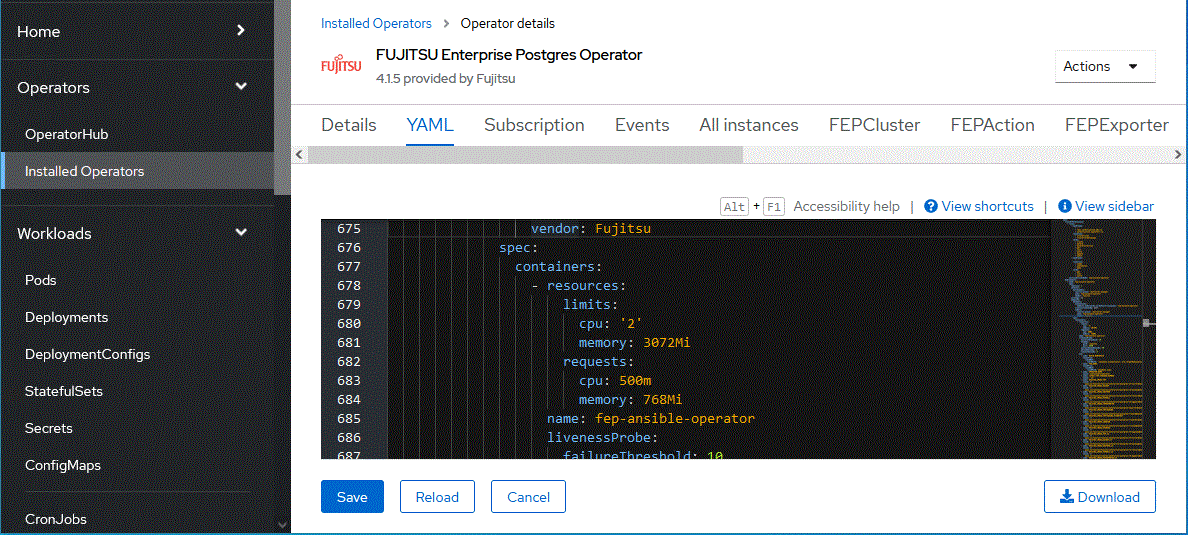
Check the CSV name of the installed operator with the "oc get" command.
$ oc get csv
NAME                                          DISPLAY                                VERSION   REPLACES   PHASE
fujitsu-enterprise-postgres-operator.v4.1.5   Fujitsu Enterprise Postgres Operator   4.1.5                Succeeded
Edit the CSV with the "oc edit" command.
$ oc edit csv fujitsu-enterprise-postgres-operator.v4.1.5
If the operator is installed using Helm Chart or RancherUI, edit the deployment of the operator container to change the resources assigned to the operator container.
Editing the Deployment's "spec.template.spec.containers[0].resources" will recreate the operator container and apply the specified resources.
Edit the Deployment "fep-ansible-operator" with the "kubectl edit" command.
$ kubectl get deployment fep-ansible-operator
NAME                   READY   UP-TO-DATE   AVAILABLE   AGE
fep-ansible-operator   1/1     1            1           2m10s

$ kubectl edit deployment fep-ansible-operator

