


ldap2pg manages database roles in an LDAP-configured system by applying management information such as users on the LDAP server to the database server. ldap2pg allows automatic synchronization of LDAP directories with FEP user accounts. The synchronisation is done by ldap2pg on a regular basis. The frequency of synchronisation can be defined as a cronjob like entry. Connectivity from ldap2pg to LDAP directory and FEP to LDAP directory must support LDAP, LDAPS and LDAP over TLS.
Built-in Operator users such as postgres, repluser, rewind_user, mydbuser should not be created/deleted/modified by ldap2pg as it may interfere with normal operation of FEP Operator and FEP Cluster. The default ldap2pg.yml supplied by the FEP Operator excludes these users.
To use ldap2pg, you need the following:
LDAP connection info
Details about LDAP directory, include ldap uri, basedn, binddn must be defined and made available to ldap2pg. The ldap.conf is used to store such information. It will be available to any software that needs connectivity information to LDAP directory, including ldap2pg and FEP.
Details of ldap.conf will be stored in a secret and mounted to fep-patroni under /etc/openldap/ldap.conf. End user should pre-create this secret before enabling ldap2pg synchronisation. If this secret is not present when ldap2pg is enabled, Operator will create a sample ldap.conf with connectivity info commented out. End user can update the secret with corresponding LDAP connectivity info. This updated information will be reflected in fep-patroni when kubelet performs syncPod function.
The Secret can be named as user-preferred, e.g., <fep-cluster>-ldapconf. Its key must be "ldap.conf" and its value should contain LDAP configuration.
Trusted CA bundle for LDAP directory
If the LDAP directory is using certificates signed by private CA to secure connections, the chain of certificates up to the root CA must be provided for ldap2pg and FEP as trusted certificates for a secure connection, be it ldaps or ldap over TLS. This chain of certificates will be stored in a configmap and mounted to fep-patroni under /tls/ldap/ca.crt. The use of such trusted certificates is optional but is recommended to authenticate the authenticity of the LDAP servers.
The ConfigMap can be named as user-preferred, e.g., <fep-cluster>-cacrt. Its key must be "ca.crt" and its value should contain LDAP server certificates which are provided by end-user.
ldap2pg.yml
Configuration file for ldap2pg to interact with LDAP directory and FEP.
Details of ldap2pg.yml will be stored in a configmap and mounted to fep-patroni under /tmp/.config/ldap2pg.yml. End user should pre-create this confimap before enabling ldap2pg synchronisation. If this configmap is not present when ldap2pg is enabled, Operator will create a sample ldap2pg.yml. End user can update the confimap. The updated information will be reflected in fep-patroni when kubelet performs syncPod function.
The ConfigMap can be named as user-preferred, e.g., <fep-cluster>-ldap2pgyml. Its key must be "ldap2pg.yml" and its value should contain ldap2pg configuration.
This section describes instructions for users to update FEPCluster CR to support ldap2pg.
First, it will need to create resources below for both LDAP configuration and ldap2pg configuration.
Secret for LDAP Configuration (ldap.conf)
ConfigMap for LDAP Server Certificates (ca.crt)
ConfigMap for ldap2pg Configuration (ldap2pg.yml)
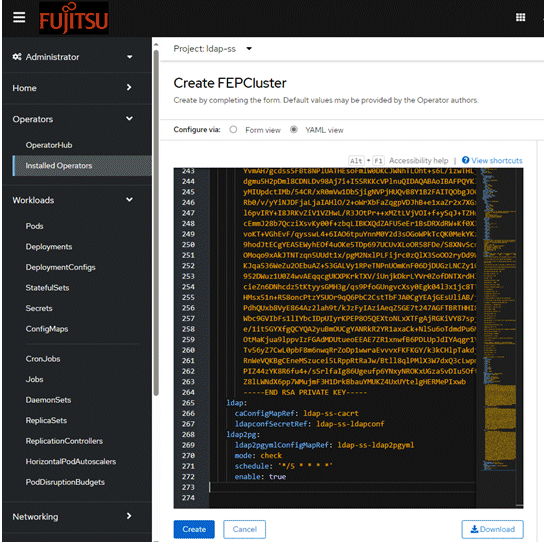
Second, it will need to add spec.ldap and spec.ldap2pg entries to a FEPCluster CR below to support ldap2pg (refer to figure below).
FEPCluster with ldap2pg enabled (fepcluster.yaml)
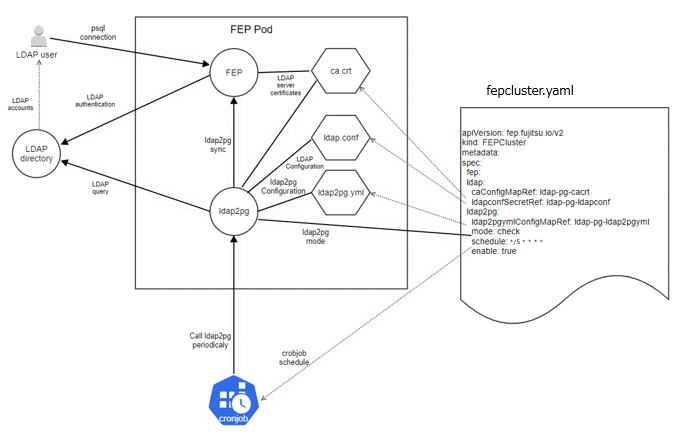
Follow the steps below to update the FEPCluster CR for ldap2pg.
Each step includes the approach by using OpenShift console and command lines.
Create a Secret for LDAP configuration (ldap.conf)
LDAP configuration includes LDAP connection info.
In this example, we assume that the LDAP server is running at ldap-server.testprj.svc, listening for LDAPS connection on port 636. The base DN is dc=example,dc=org. The LDAP user cn=admin,dc=example,dc=org is used to connect to LDAP server and the password is "mypassword".
Sample LDAP configuration (ldap.conf)
$ cat ldap.conf

#
# LDAP Defaults
#

#Refer to https://www.openldap.org/software/man.cgi?query=ldap.conf for full configuration details
# This file should be world readable but not world writable.

#BINDDN: This is the user to bind to LDAP server
BINDDN  cn=admin,dc=example,dc=org

#BASE: Set it to the base DN where search will begin
BASE   dc=example,dc=org

#PASSWORD: Password of user as defined in BINDDN
PASSWORD mypassword

#URI: Specify the URI of LDAP server
URI   ldaps://ldap-server.testprj.svc:636

#SIZELIMIT    12
#TIMELIMIT    15
#DEREF        never
TIMEOUT       15

# TLS certificates (needed for GnuTLS)
# TLS_CACERT      /tls/ldap/ca.crt

# Specifies what checks to perform on server certificates in a TLS session. We are
# being relax here even if server certificate cannot be verified.
TLS_REQCERT allow
Create a Secret by OpenShift.
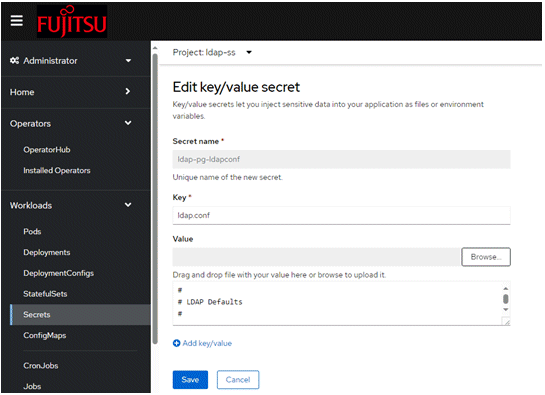
Create a Secret by command-lines
$ kubectl -n ldap-ss create secret generic ldap-ss-ldapconf --from-file=ldap.conf
secret/mysecret created
Create a ConfigMap with chain of certificates (ca.crt) that sign the LDAP server certificate
Sample LDAP server certificates (ca.crt)
$ cat ca.crt

-----BEGIN CERTIFICATE-----
xxx root cert xxx
-----END CERTIFICATE-----
-----BEGIN CERTIFICATE-----
yyy intermediate cert yyy
-----END CERTIFICATE-----
Create a ConfigMap by OpenShift.
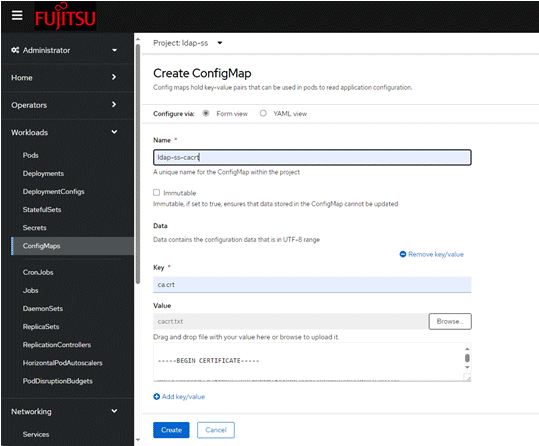
Create a ConfigMap by command-lines
$ kubectl -n ldap-ss create configmap ldap-ss-cacrt --from-file=ca.crt
configmap/ldap-ss-cacrt created
Create a ConfigMap for ldap2pg.yml file
The following users are managed by operators, so specify them in roles_blacklist_query in the postgres section to remove them from ldap2pg management.
postgres user
Username specified in spec.fepChildCrVal.sysUsers of FEPCluster custom resource
For other ldap2pg.yml settings, refer to "ldap2pg" in the Fujitsu Enterprise Postgres Installation and Setup Guide for Client.
Sample ldap2pg configuration (postgres section of ldap2pg.yml)
postgres:
  roles_blacklist_query: [postgres, repluser, rewind_user, pwsyncuser, pg_*, pgx_*, ]
  databases_query: [postgres]
Create a ConfigMap by OpenShift.
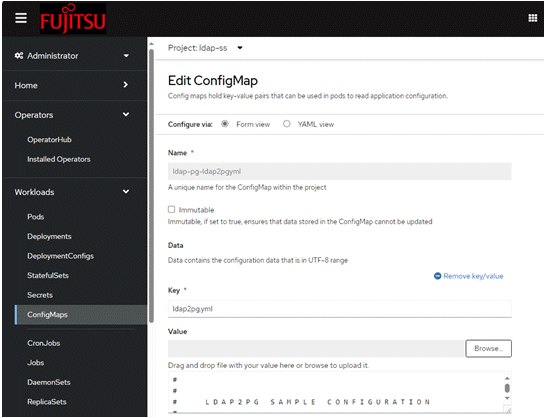
Create a ConfigMap by command-lines
$ kubectl -n ldap-ss create configmap ldap-ss-ldap2pgyml --from-file=ldap2pg.yml
configmap/ldap-ss-ldap2pgyml created
Add spec.ldap and spec.ldap2pg entries to FEPCluster CR (fepcluster.yaml)
It will need to add the entries below to FEPCluster CR during the creation and updating of FEPCluster.
Key | Value | Description |
|---|---|---|
spec.ldap.caConfigMapRef | ldap-ss-cacrt | Refer to step 1 |
spec.ldap.ldapconfSecretRef | ldap-ss-ldapconf | Refer to step 2 |
spec.ldap2pg.ldap2pgymlConfigMapRef | ldap-ss-ldap2pgyml | Refer to step 3 |
spec.ldap2pg.mode | Default value is "check" | |
spec.ldap2pg.schedule | Default value is ‘*/5 * * * *’ | |
spec.ldap2pg.enable | Default value is true |
You can disable ldap2pg feature by setting the spec.ldap2pg.enable to false.
Sample FEPCluster CR with ldap2pg changes (ldap2pg is enabled) (fepcluster.yaml)
$ cat fepcluster.yaml

apiVersion: fep.fujitsu.io/v2
kind: FEPCluster
metadata:
  name: ldap-ss
  namespace: ldap-ss
spec:
  ldap:
    caConfigMapRef: ldap-ss-cacrt
    ldapconfSecretRef: ldap-ss-ldapconf
  ldap2pg:
    ldap2pgymlConfigMapRef: ldap-ss-ldap2pgyml
    mode: check
    schedule: '*/5 * * * *'
    enable: true
Update FEPCluster CR by OpenShift.
Update FEPCluster CR by command-lines
$ kubectl apply -f fepcluster.yaml

