This feature is initially available only to the extension owner (the database user who enabled the extension) immediately after installation. For other database users to use this feature, privilege must be granted by the extension owner.
Users with model import privileges can import their models into the database. The user who imports the model becomes the owner of that model. Only users authorized by the model owner can use that model.
Loading a model requires separate model loading privileges from importing.
The extension owner grants model import and loading privileges to appropriate users. Meanwhile, the model owner grants model usage privileges to appropriate users. To utilize this extension feature, the necessary users are referred to as the extension owner, model owner, system administrator, and model user.
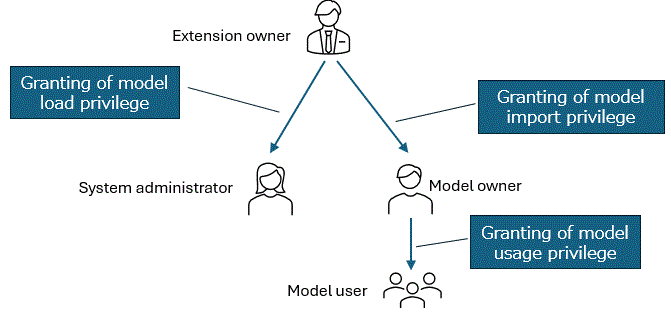
The roles of each user are as follows:
Extension owner: Grants appropriate privileges to each user.
Model owner: Manages each model and grants execution privileges for the model.
System administrator: Properly manages disk consumption and memory usage by the model.
Model user: Uses the model for inference (vectorization).
Additionally, each user is assigned "possible operations (execution of commands and functions)" and "privileges that can be granted or revoked to others". These are shown in the table below.
Operation/Privilege | Extension owner | Model owner | System administrator | Model user | |
|---|---|---|---|---|---|
Operation | Import model | Possible | Possible | Impossible | Impossible |
Delete model | Possible | Only my model is possible | Possible | Impossible | |
Update model | Possible | Only my model is possible | Impossible | Impossible | |
Refer to model file | Possible | Only my model is possible | Impossible | Impossible | |
Load/Unload model | Possible | Impossible | Possible | Impossible | |
Reference to the total size of the loaded models | Possible | Impossible | Possible | Impossible | |
Use model | Possible | Only my model is possible | Impossible | Only permitted models are possible | |
Refer to metadata | Possible | Only my model is possible | Possible | Only permitted models are possible | |
Refer to model status | Possible | Only my model is possible | Possible | Only permitted models are possible | |
Granting/revoking privilege to others | Import model | Possible | Impossible | Impossible | Impossible |
Delete model | Possible | Impossible | Impossible | Impossible | |
Update model | Possible | Impossible | Impossible | Impossible | |
Load/Unload model | Possible | Impossible | Impossible | Impossible | |
Use model | Possible | Only my model is possible | Impossible | Impossible | |
Execution privilege for referencing metadata (function) | Possible | Only my model is possible | Impossible | Impossible | |
Execution privilege for referencing model status (function) | Possible | Only my model is possible | Impossible | Impossible | |
Granting and revoking the necessary privileges for model owners and system administrators is done using the pgx_grant_model_role function and the pgx_revoke_model_role function. These functions can only be executed by extension owners.
Example) Granting of privilege
SELECT pgx_inference.pgx_grant_model_role('target_user_name','model_owner') - Grant model owner privilege to the user named "target_user_name"Example) Revoking of privilege
SELECT pgx_inference.pgx_revoke_model_role('target_user_name','model_owner') - Revoke model owner privilege to the user named "target_user_name"Model users need EXECUTE privileges for the function corresponding to the model ID. The owner of the model should execute the GRANT and REVOKE statements to grant or revoke these privileges.
When a model is imported, it is stored in a table called pgx_models. At this time, a model ID is assigned to the imported model. A function is created for this model ID, which is called the function corresponding to the model ID. The function name corresponding to the model ID can be obtained using the pgx_get_function_by_model_name function.
SELECT pgx_inference.pgx_get_function_by_model_name(‘target_model’);
pgx_get_function_by_model_name
-----------------
pgx_embedding_1
(1 row)

GRANT EXECUTE ON FUNCTION pgx_inference.pgx_embedding_1(text) TO target_user_name;
To use the functions provided by this feature, you need USAGE privilege on the pgx_inference schema. These privileges are granted to system administrators and model owners through the pgx_grant_model_role function. For model users, the extension owners needs to grant USAGE privilege. As shown in the table above, simply granting USAGE privilege does not allow users to reference or use the model, so it is possible to grant USAGE privilege in advance.
To achieve model-level access control, access control in Triton Inference Server is also necessary. For more details, refer to "5.4.3 Security".